Extra 8% Off sitewide with "PD8"
Free shipping


Accidental damage in year one, plus service after the original warranty.
Added as a separate cart item. Terms, conditions and exclusions apply.
We provide free home delivery for orders over $30.
We ship from our CA warehouse whenever stock is available, with delivery typically taking 3–7 days. If items are dispatched from our international warehouse, delivery may take 7–15 days.
All orders are trackable, and you will receive an email with tracking details once your order has been shipped.
With our clinically tested and proven system, we are confident in what we deliver.
You may request a full refund by returning your undamaged products within 30 days. Once the item is received at the Freyara warehouse and passes inspection, the refund process will begin.
For detailed information regarding refunds, please contact our customer service at suri@freyara.com
Freyara offers a one-year warranty to ensure your shopping experience is worry-free.
If your product experiences any quality issues within one year of purchase, simply provide your order receipt and contact our customer service team at suri@freyara.com .
We will assist you with confirmation and provide safe, convenient repair or replacement services.
We'll always be there for you.
We provide product tutorials and dedicated support just for you!
If you have any questions, please feel free to contact our customer service team at suri@freyara.com
.
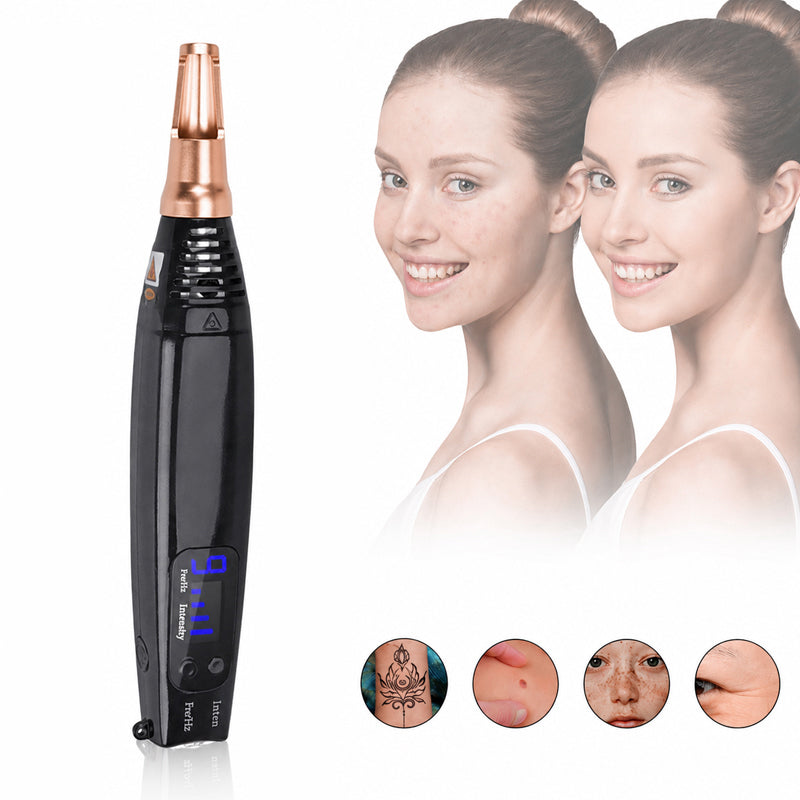
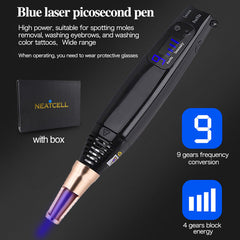
【Salon-Strength Pigment Eraser】450nm wavelength, 9 frequency modes, higher power. Wear protective glasses. Best for dark moles, old tattoos, deep pigmentation and eyebrow tattoo removal.
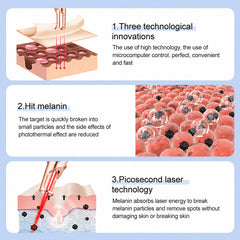
* 【No Damage to Healthy Skin】Electric ion carbonation turns energy into pinpoint heat that targets only melanin.
* 【Fewer Sessions, Faster Results】Powerful picosecond pulses shatter pigment into dust your body flushes out naturally. You need fewer treatments than traditional lasers, see dark spots, moles or tattoos fade quicker.
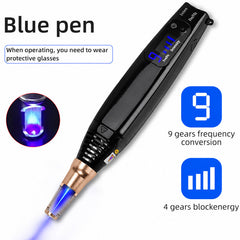
* 【9 Frequencies and 4 Intensities】Easily adjust speed and energy to match any skin type or target area. Start low for sensitive areas, go higher for stubborn ink or thick moles. Customize until it feels right.
* 【Powerful but Controlled】Stronger effect means faster fading. Wear goggles at all times. Max 2 seconds per spot. For best results and safety, have a friend operate the pen on hard-to-reach areas, or use a mirror with care.


How to use?
1. Plug in the power, and the machine is energized,the digital tube displays.
2. Press the "Inten" and "Fre/Hz" button to select the intensity and frequency.we suggest start the operation from the lowest intensity and frequency, then upgrade as needed.
3. Coated with anesthesia if you are afraid of pain, there will be a little pain when using the laser pen,feels like intravenous injection.
4.Wear protective glasses.
Note: Blue laser pen need to wear protective glasses because it keeps flashing.
5.Put the hole of the pen towards to the spot where you want to operate with , for Blue laser pen. Continuously press the Switch button , then laser light appears,stop pressing the Switch button after 1-2 seconds, then Repeatedly.
Note:for Blue laser pen ,we suggest do not stay in the same location for more than 2 seconds.
6.Laser pen have an effect on melanin,after operation , you will see the mole turn more black,then you can stop , after a few days, it will fade and even disappear. For some mole, it will cocoon, do not destroy it ,leave it shedding naturally.
7.Cover with repair essence at once after operated,repeat to use repair essence in the following days, do not expose to the sun,otherwise the skin will be sunburn.
Frequency of use: It should only be used again after the wound has completely healed.
Difference between Red light picosecond & Blue light picosecond
The blue light's wavelength is 450nm. And the red light's wavelength is 850nm.
The power and effect of blue light picosecond pen is more stronger. It need more professionl operation. Please start from the lowest frequency, then slowly adjust to the suitable level.The blue laser pen have 9 levels Frequency mode, different output frequency and wavelength. The flash area is bigger.
The red laser pen have 3 Frequency mode, its flash area is smaller. It suitable for subtle opperation.
How to choose Blue Light and Red Light ?
Both of them for removing Tattoo, Mole, Speckle ect, mainly apply for melanin.
Blue light Picosecond pen for beauty salon use or if someone can help you operate it , you can not operate it yourself because you need to wear the protective eyes glasses , its power and effect is bigger than Red light Picosecond pen.If you have someone to help you , we recommend buying blue light Picosecond pen.
Red light Picosecond pen for personal home use , you can operate it by yourself . its power and effect is smaller than Blue light Picosecond pen.
CAUTION
1.During operation,wear protective glasses.
2.Keep the machine clean and avoid contact with other contaminants.
3.No unauthorized operation of the hand.
4.After use,please keep it properly after cleaning
5.Laser treatment will be painful, so it is recommended to apply anesthetic to the operation site before the operation.
Specifications:
RATED VOLTAGE:110V-220V
WORKING FREQUENCY:1-9HZ
PRODUCT MATERIAL:ABS+STAINLESS STEEL
PRODUCT SIZE:19*3.5*3.5CM
PACKAGING SIZE:21*5*16CM
PACKAGING WEIGHT:460G
The Upgraded version has more stable energy output than the Lite version.
Packing List:
Picosecond Pen*1
Adapter*1
Goggles*1
Manual*1
POWER & SETUP
Connect FacialPure Lite Upgrade 450 nm to the supplied power adapter.
The corded design provides consistent power throughout professional precision-care routines.
DIGITAL DISPLAY
The digital display provides clear visibility of the selected pulse-speed and intensity settings.
PULSE-SPEED CONTROL
Use the Fre/Hz control to choose from nine adjustable pulse-speed settings:
1–9 Hz
Lower settings provide slower pulse repetition for more deliberate spot-by-spot control.
Higher settings provide faster pulse repetition for more efficient operation.
INTENSITY CONTROL
Use the Inten control to choose from four adjustable intensity levels.
Begin at Level 1 and gradually increase according to the selected treatment routine.
PRECISION TREATMENT APERTURE
Position the treatment aperture directly over the selected small target area before activating output.
OUTPUT CONTROL
Activate the treatment output only after the treatment aperture is accurately aligned with the selected area.
Keep each output controlled and avoid remaining continuously over one position beyond the recommended operating time.
PROTECTIVE EYEWEAR
Wear the included protective goggles throughout operation.
CORDED POWER
Rated Voltage:
110–220 V
Operation:
Corded / Plug-In
1–3 Hz — Maximum Precision
Lower pulse-repetition settings provide slower, more deliberate output for controlled spot-by-spot operation.
Best for:
• First-time routines
• Small target areas
• Precision pigment care
• Detailed tattoo areas
4–6 Hz — Balanced Precision & Efficiency
Mid-range pulse-speed settings balance controlled positioning with faster operation.
Best for:
• General pigment-focused routines
• Multiple small target areas
• Tattoo-focused precision care
7–9 Hz — Faster Pulse Repetition
Higher pulse-speed settings provide the fastest available repetition for efficient professional operation across suitable target areas.
INTENSITY LEVEL 1 — Starting Level
The lowest available intensity for beginning a new routine and becoming familiar with device output.
INTENSITY LEVELS 2–3 — Balanced Professional Care
Intermediate settings for customizable pigment and tattoo-focused routines.
INTENSITY LEVEL 4 — Maximum Intensity
The highest available intensity setting for suitable professional precision-care routines.
HOW TO CHOOSE
Start with a lower pulse-speed and intensity setting.
Increase gradually according to the treatment area, pigment characteristics and desired professional routine.
1. Clean and completely dry the selected treatment area.
2. Remove makeup and skincare products from the target area.
3. Connect the FacialPure Lite Upgrade 450 nm to the supplied power adapter.
4. Put on the included protective goggles.
5. Turn on the device.
6. Begin with the lowest pulse-speed setting.
7. Select Intensity Level 1 as your starting level.
8. Position the treatment aperture directly over the selected target area.
9. Activate the output while maintaining accurate positioning.
10. Keep each treatment point controlled for approximately 1–2 seconds.
11. Move systematically to the next target area.
12. Increase pulse speed or intensity gradually when desired.
13. Avoid repeatedly treating the same point for longer than approximately 2 seconds at one time.
14. Turn off and disconnect the device after completing the routine.
15. Keep the treatment aperture clean and dry.
16. Follow a gentle post-treatment skincare routine.
17. Allow the treated area to recover before repeating the routine.
Brand:
FREYARA
Series:
FacialPure Lite Upgrade
SKU:
FY2501.0003.0050
Version:
Professional Blue-Light Version
Product Type:
Picosecond Laser Pen
Optical Wavelength:
450 nm
Light Type:
Blue Light
Pulse Repetition Range:
1–9 Hz
Pulse-Speed Levels:
9
Intensity Levels:
4
Treatment Aperture:
Precision Small-Area Aperture
Display:
Digital Pulse-Speed & Intensity Display
Operation:
Corded / Plug-In
Rated Voltage:
110–220 V
Battery:
No
Material:
ABS + Stainless Steel
Product Size:
Approx. 19 × 3.5 × 3.5 cm
Package Size:
Approx. 21 × 5 × 16 cm
Package Weight:
Approx. 460 g
Protective Goggles:
Included
Warranty:
One-Year Limited FREYARA Warranty
Your FREYARA FacialPure Lite Upgrade is backed by a one-year limited warranty and a 30-day money-back guarantee.
If you experience a product issue, contact FREYARA Customer Support with your order number, product SKU and clear photos or video showing the issue.
Return authorization is required before sending the product back.
Damage caused by misuse, unauthorized modification, incompatible accessories, improper power supply or improper care is not covered.
Terms, conditions and exclusions apply.
Laser and optical-light safety precautions apply.
Read the supplied user manual before first use.
Wear the included protective goggles throughout operation.
Never direct the treatment output toward the eyes, eyelids or reflective surfaces.
Use the device only on suitable small external skin areas.
Do not use over open wounds, burns, active infection or significantly irritated skin.
Avoid treatment over suspicious or visibly changing skin growths.
Begin with the lowest pulse-speed and intensity settings.
Keep individual treatment points controlled and avoid remaining continuously over the same location for more than approximately two seconds.
Avoid repeatedly treating the same point until excessive burning, blistering or unwanted skin damage occurs.
Stop use if you experience excessive pain, burning, blistering, unexpected bleeding, severe swelling or persistent irritation.
Keep the treatment aperture, power cable and adapter clean and dry.
Disconnect the device from power before cleaning or storage.
Keep away from children.
Q: What is FacialPure Lite Upgrade 450 nm designed for?
A: FacialPure Lite Upgrade 450 nm is a professional picosecond laser pen designed for precision tattoo, mole, dark spot and pigmentation-focused small-area care.
Q: What wavelength does this version use?
A: This version operates at 450 nm blue-light wavelength.
Q: Is this the blue-light version?
A: Yes. FY2501.0003.0050 is the FacialPure Lite Upgrade Professional Blue-Light version.
Q: What is the difference between the 450 nm and 850 nm FacialPure Lite Upgrade?
A: The 450 nm version provides nine 1–9 Hz pulse-speed settings and a higher-output professional configuration, while the 850 nm version uses three 1–3 Hz pulse-speed settings for more subtle precision-focused operation.
Q: How many pulse-speed settings does the 450 nm version have?
A: It provides nine adjustable pulse-speed settings.
Q: What is the pulse-speed range?
A: The device operates from 1 to 9 Hz.
Q: Does 1–9 Hz change the laser wavelength?
A: No. The wavelength remains 450 nm. The 1–9 Hz setting controls pulse repetition speed.
Q: What are 1–3 Hz settings best for?
A: Lower settings provide slower pulse repetition for careful, highly controlled spot-by-spot operation.
Q: What are 4–6 Hz settings best for?
A: Mid-range settings provide a balance between precision and operating efficiency.
Q: What are 7–9 Hz settings best for?
A: Higher settings provide faster pulse repetition for efficient professional operation across suitable treatment areas.
Q: How many intensity levels are available?
A: Four adjustable intensity levels are available.
Q: Which intensity should I start with?
A: Begin at Level 1 and gradually increase according to your selected treatment routine.
Q: Can FacialPure Lite Upgrade 450 nm be used for tattoos?
A: Yes. Tattoo-focused precision care, including old tattoos and eyebrow tattoos, is one of the current product applications.
Q: Can it be used for dark pigmentation?
A: Yes. Dark pigmentation, dark spots and melanin-focused care are among the current applications.
Q: Can it be used for dark moles?
A: Yes. Dark-mole-focused precision care is included among the current product applications.
Q: Is the device intended for broad full-face treatment?
A: FacialPure Lite Upgrade 450 nm is primarily designed for controlled small-area precision operation rather than broad full-face treatment.
Q: What is the precision treatment aperture?
A: The compact treatment opening helps concentrate operation on selected small target areas.
Q: Does the device have a digital display?
A: Yes. The display shows operating information for pulse-speed and intensity settings.
Q: Is the device rechargeable?
A: No. It uses corded plug-in operation for consistent power.
Q: What voltage does it support?
A: The device supports 110–220 V operation.
Q: Are protective goggles included?
A: Yes. Protective goggles are included in the package.
Q: Should protective goggles be worn during use?
A: Yes. Wear the included protective goggles throughout operation.
Q: How long should the device remain over one treatment point?
A: Keep each treatment position controlled for approximately one to two seconds and avoid remaining continuously over the same location for more than approximately two seconds.
Q: What comes in the box?
A: The package includes the FacialPure Lite Upgrade 450 nm laser pen, power adapter, protective goggles and user manual.
Q: What warranty is included?
A: FREYARA Canada provides a one-year limited warranty and a 30-day money-back guarantee, subject to the applicable terms and conditions.
The supplier-listed 450 nm optical configuration was clearly identified in the setup information for the small test area. The buttons have a clear response once the operating sequence is understood. The strongest part of the setup is the four intensity levels. The system feels practical for a dedicated equipment area.
We appreciate your feedback, Wesley. It is helpful to hear that the controls and equipment layout were straightforward to use.
I tested the nine pulse-speed settings on a practice surface and started from the lowest available setting. Starting at the lowest permitted setting made the interface easier to learn. I especially liked the four intensity levels. The controls became easy to manage after the first practice session.
Thanks for the detailed feedback, Brianna. We are pleased that the layout and settings worked well.
The supplier-listed 450 nm optical configuration was clearly identified in the setup information for the small test area. The unit feels sturdy on a stable counter or dedicated cart. A practical advantage is the simple plug-in setup. It works smoothly once the cables and controls become familiar.
Thanks for sharing both the positives and the small usability issues, Brianna.
I verified the supplier-listed 450 nm optical configuration in the settings before working on a precision target area. The full manual should be read before the first setup. For me, the simple plug-in setup made the equipment easier to organise. The equipment is practical overall, with a few usability details to improve.
Thank you for the balanced feedback, Grace. We have noted your comments about the setup.
The nine pulse-speed settings was straightforward to adjust during a precision target area setup. The digital setting display is easy to read, and the main controls are clearly arranged. The workflow feels clearer because of the nine speed settings. The system feels practical for a dedicated equipment area.
Thank you for sharing your experience, Madison. We are glad the setup became easier to manage after the first session.
Thanks for subscribing!
This email has been registered!